Building IOC&YARA MGMT → ZIoCHub - From IIS Text Files to a Modern IOC Management Platform
The Story Behind ZIoCHub 🚀
So, here’s the thing… 😅
Anyone who’s been following my work knows that about a year ago, I built a system based on IIS that had one simple goal: to serve IOC feeds from the SOC team to various security systems in the network. I didn’t overthink it - just made something super simple based on TXT files.
“It’s just text files, how complicated can it be?” 🤔
Well, it worked… but you know how these things go. 🤷♂️
Then the SOC team grew, and suddenly there were way more requirements popping up everywhere like mushrooms after rain:
- ❌ No tracking of who submitted what (whoops, forgot to add that!)
- ❌ Junior analysts making mistakes (putting hashes in URL files, forgetting to add their names, not documenting dates… classic!)
- ❌ Need for temporary IOC blocking (because sometimes you just need to block something for a week, not forever)
- ❌ Need to track IOCs and remove duplicates (because apparently copy-paste is hard)
- ❌ And more… and more… and MORE! 😤
“Feature creep? What’s that?” - Me, probably 🤦♂️
At first, I built a simple web system that allowed analysts to update IOCs through the web interface. It gave a very minimal solution (think: “it works on my machine” level of minimal), but as time passed, the need for something more comprehensive kept growing.
“Just one more feature…” - Famous last words 🎭
So I decided to dust off the old development lab (literally, there was dust 🕷️) and write some proper code on Linux! 🐧
Since we have a MISP system running on Ubuntu, I decided to develop the new system alongside it - it would receive data from MISP and from analysts, and generate feeds for the various security systems in the organization.
“This time I’ll do it right!” - Me, definitely this time 💪
That evolution is today ZIoCHub – the same platform, renamed and grown into ZIoCHub v2.0 Beta: a full IOC & YARA management portal for SOC operations, still 100% offline-first.
Meet ZIoCHub v2.0 Beta 🎯
This project is particularly close to my heart 💚, mainly because it combines several open-source projects I already knew and loved, but specifically focuses on one thing: IOCs (and YARA). The goal was simple: create something that analysts would actually want to use, not just tolerate. Something that gives them the drive to do more cybersecurity-related work instead of just staring at screens and filling out forms.
“If they’re going to spend 8 hours a day on this, it better be enjoyable!” - My inner UX designer 🎨
And you know what? It worked! The modern UI, smooth animations, and intuitive workflow actually made IOC management… dare I say it… fun? Well, at least less painful! 😄
Standing on the Shoulders of (Open Source) Giants 🧱
So here’s the thing about ZIoCHub – I didn’t write everything from scratch. I’m not that crazy. 🤪
I basically went on a shopping spree through the open-source aisle and grabbed everything that wasn’t nailed down:
- Flask for the web framework – because Django felt like bringing a tank to a knife fight 🔪
- Flask-Login for authentication – because writing session management from scratch is how you become the security incident 🔐
- Flask-SQLAlchemy for the ORM – because raw SQL strings are just stored procedures with extra anxiety 😰
- SQLite for the database – because when your server is air-gapped, telling the SOC team “just install PostgreSQL” is a great way to get uninvited from lunch 🍽️
- Tailwind CSS for styling – because life is too short to write
margin-left: 12pxfor the 47th time 🎨 - Chart.js for dashboards – because managers don’t read tables, they read colorful lines going up 📈
- vis.js for the campaign graph – because I wanted analysts to feel like they’re in a spy movie connecting red strings on a corkboard 🕵️
- Prism for syntax highlighting – because staring at monochrome YARA rules is a form of punishment 😵
- jsPDF + html2canvas for PDF export – because apparently “just screenshot it” isn’t a valid answer to “can I get a report?” 📄
- Flag Icons for country flags – because IP addresses are boring, but IP addresses with tiny flags are suddenly interesting 🏳️
- marked + turndown for Markdown – because some analysts think in Markdown and others think in HTML, and I refuse to pick sides ⚖️
- geoip2 + MaxMind for GeoIP lookups – because knowing an IP is malicious is good, but knowing it’s malicious and from somewhere specific is better 🌍
- ldap3 for LDAP/AD auth – because asking analysts to remember yet another password would have started a mutiny ⚓
- PyMISP for MISP integration – because manually copy-pasting IOCs from MISP defeats the entire purpose of having MISP 🤦
- dxlclient + dxltieclient for McAfee DXL/TIE – because when management asks “but what does ePO think about this hash?” you’d better have an answer 🤷
At some point I realized I had more import statements than actual business logic. But hey – why reinvent the wheel when you can import 19 wheels and bolt them together into something beautiful? 🛞✨
“Good artists create. Great artists pip install.” – Definitely not Picasso 🖼️
What is ZIoCHub?
ZIoCHub is a modern IOC (Indicators of Compromise) and YARA rule management platform built specifically for SOC operations in offline/air-gapped environments. Analysts submit indicators; ZIoCHub stores them in a SQLite database; security devices consume plain-text feeds (and optionally TAXII 2.1 / STIX 2.1) for enforcement.
Key Features ✨
- 🔒 100% Offline: No CDN, no external APIs; all assets and dependencies are local.
- 📊 Modern Glass UI: Glassmorphism design with light/dark mode and English/Hebrew (i18n).
- 🗄️ SQLite Backend: Single-file DB, easy backup and restore.
- 🔐 Authentication: Local accounts, optional LDAP/AD, admin roles, profile (display name, avatar), change password, optional “must change password” on first login.
- 📡 MISP Integration: Automatic IOC pull from a local MISP instance with configurable intervals.
- 📜 YARA Rule Management: Upload, approval workflow, quality scoring (10–50 pts), campaign linking, syntax highlighting (Prism).
- 🎯 Campaign Management: Visual graph (vis.js) of campaigns and associated IOCs (and YARA).
- 📈 Champs Analysis: Analyst leaderboard, multiple scoring methods (Weighted, Flat, By Type, Campaign Focus, Time Decay, Quality, Goal-Based, Smart), streak bonuses, team goals, rank tracking, activity spotlight, news ticker.
- 📉 Feed Pulse: Real-time feed health (incoming/outgoing IOCs, anomalies) with sanity checks and analyst exclusions.
- 📑 Intelligence Reports: Period-based reports (day/week/month) with KPIs, type distribution, feed health, analyst activity, export to PDF.
- 🌍 Multi-vendor Feeds: Standard, Palo Alto (EDL), Checkpoint (CSV); plus YARA feeds and TAXII 2.1 / STIX 2.1 for clients (e.g. Cisco IronPort ESA).
- 📜 IOC History: Full lifecycle per IOC (created, edited, deleted, expired, excluded, unexcluded).
- 📝 IOC Notes: Analyst notes per IOC (by type+value); notes survive IOC deletion cycles.
- 🛡️ Allowlist / Safety Net: Admin-managed allowlist to prevent blocking critical infrastructure.
- 🔍 Sanity Checks: Automatic anomaly detection (local IPs, short domains, critical infra).
- 🌐 GeoIP Intelligence: Country, TLD, and email domain analytics; Rare Find badges.
- 🔒 SSL/TLS: Certificate upload via Admin UI; HTTP-to-HTTPS redirect.
- 📋 CEF / Syslog: Optional CEF audit logging with 48-hour local rotation and UDP syslog.
The UI – Screen by Screen (with placeholders for screenshots)
Below, each main tab (and Profile / Admin) has a placeholder image and a short description. Replace the image path with your own screenshot when you have it (e.g. under assets/images/ziochub/).
1. Live Stats
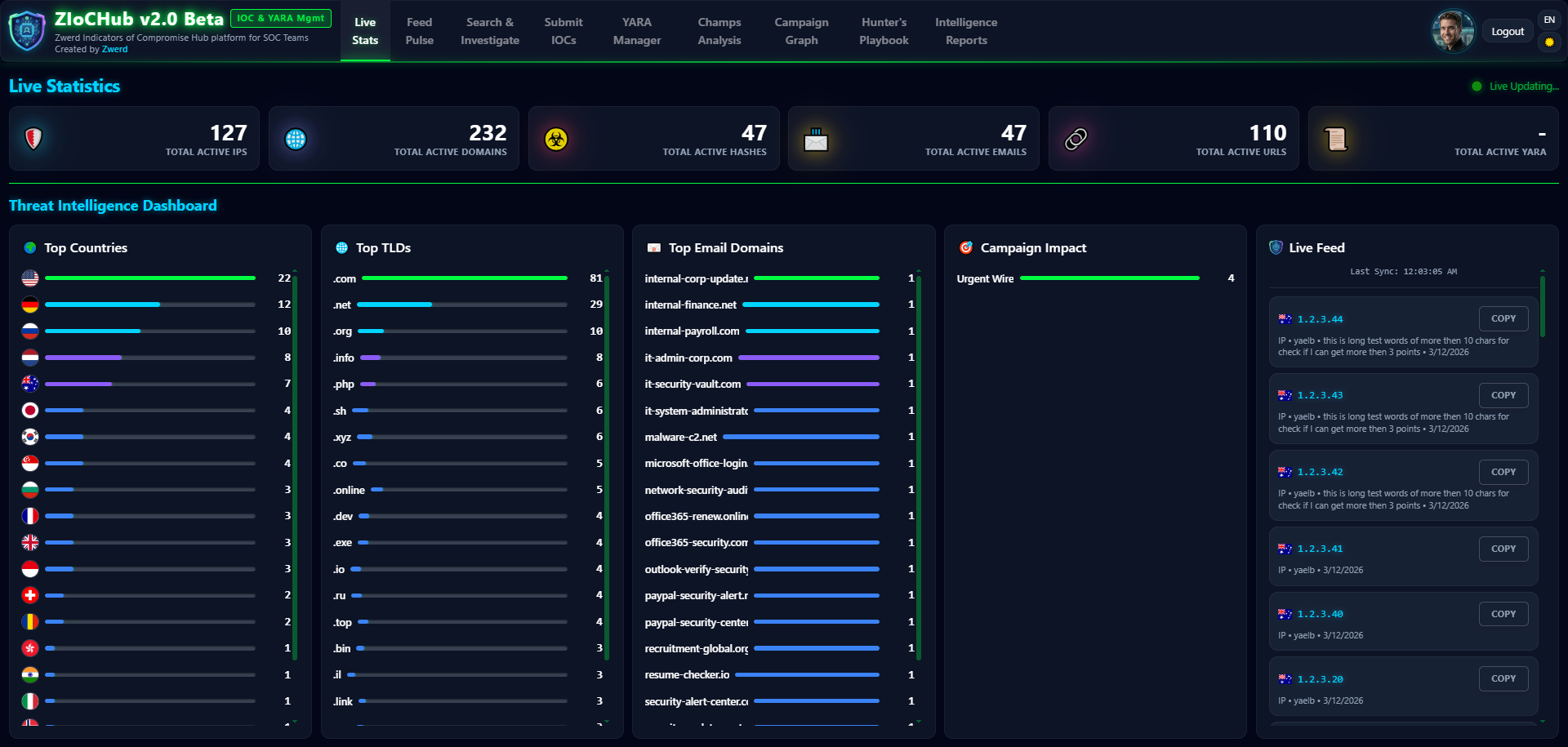
What you see here: Real-time dashboard with IOC counts by type (IP, Domain, URL, Email, Hash), Top Countries / TLDs / Email Domains leaderboards (with flag icons), and a live feed of the latest IOCs. Auto-refresh; all data is GeoIP-based and active (non-expired) only.
2. Feed Pulse
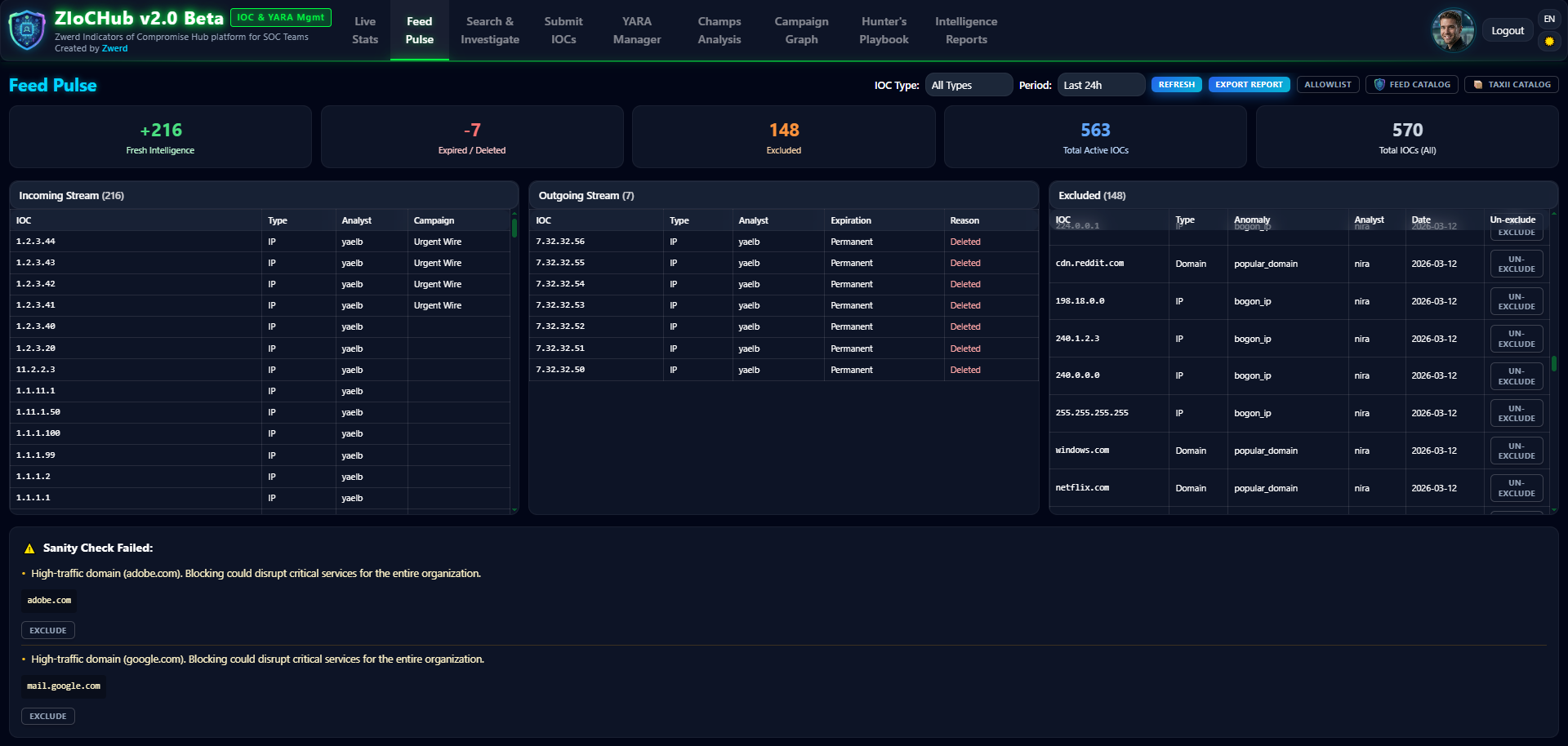
What you see here: Real-time feed health monitoring – incoming IOCs, outgoing (expired) IOCs, deletions, and Sanity anomalies (local IPs, short domains, critical infra). Analysts can mark anomalies as exclude/un-exclude to control what appears in the feed.
3. Search & Investigate
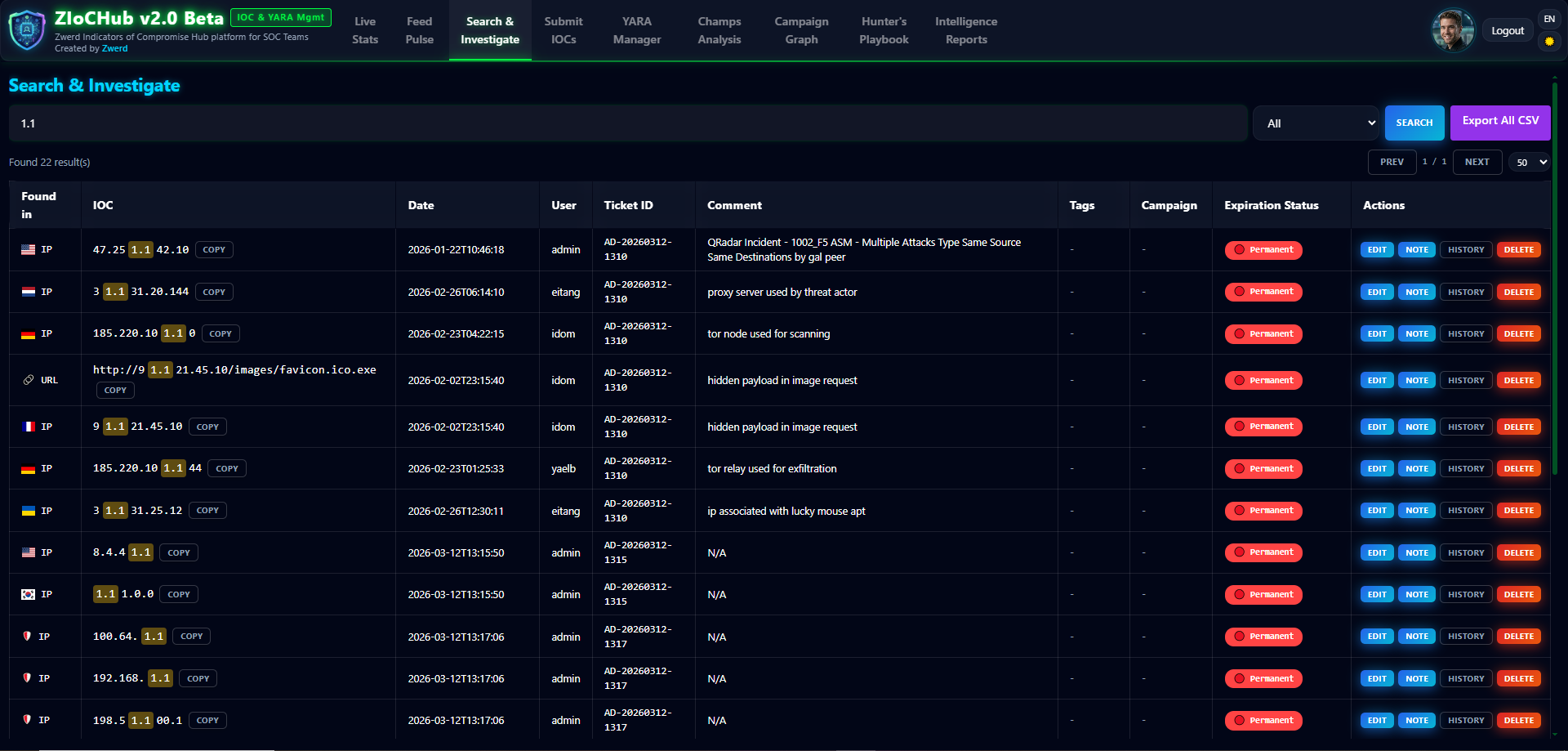
What you see here: Full-text search across all IOCs with filters: value, type, ticket, user, date, expiration status. Inline edit and delete; view full history per IOC (created, edited, deleted, expired, excluded, unexcluded).
4. Submit IOCs
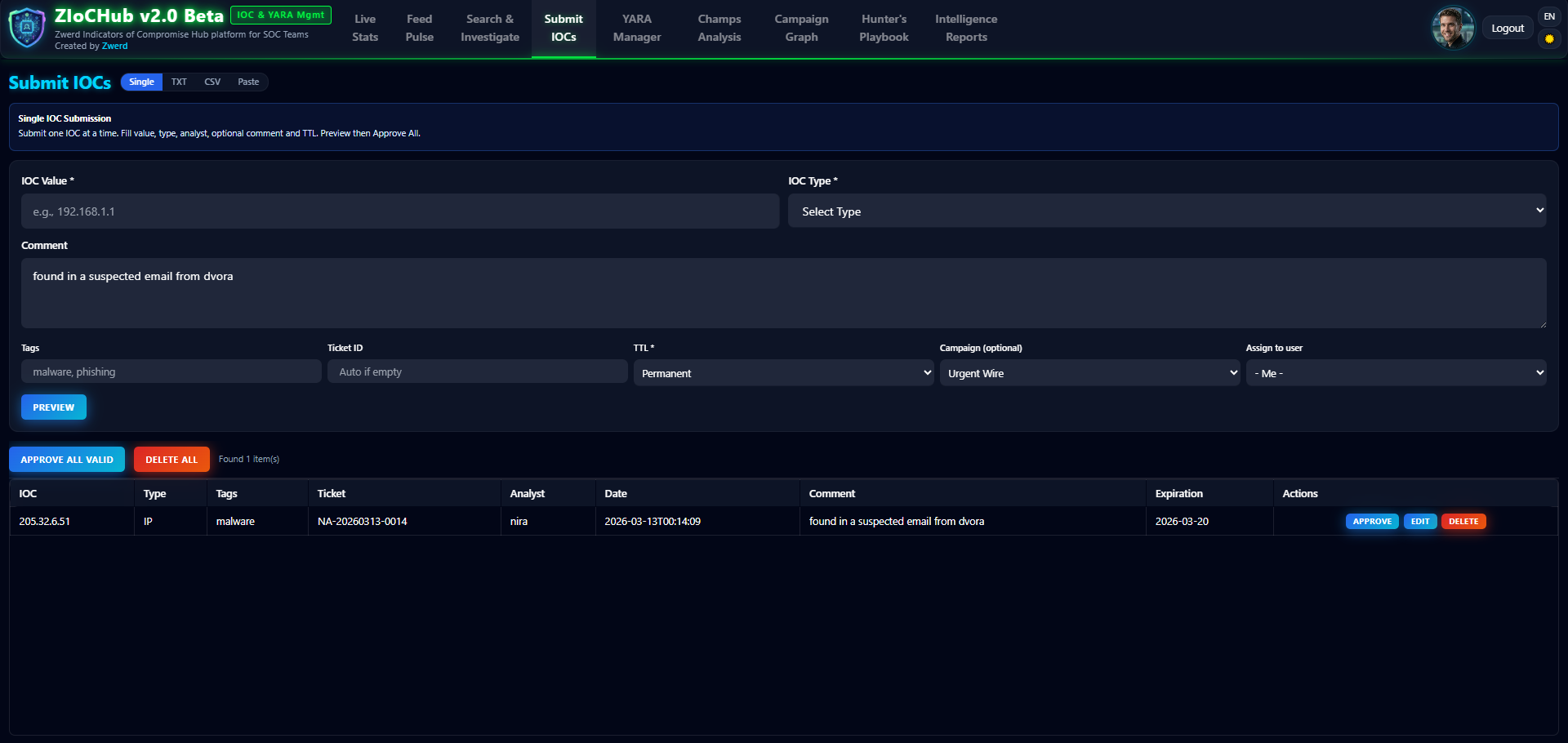
What you see here: Single and bulk submission. Single: auto type detection, refanger cleaning, TTL, campaign, allowlist check. Bulk: CSV and TXT import with preview (staging), auto-detection, metadata extraction, and conflict handling before final submit.
5. YARA Manager
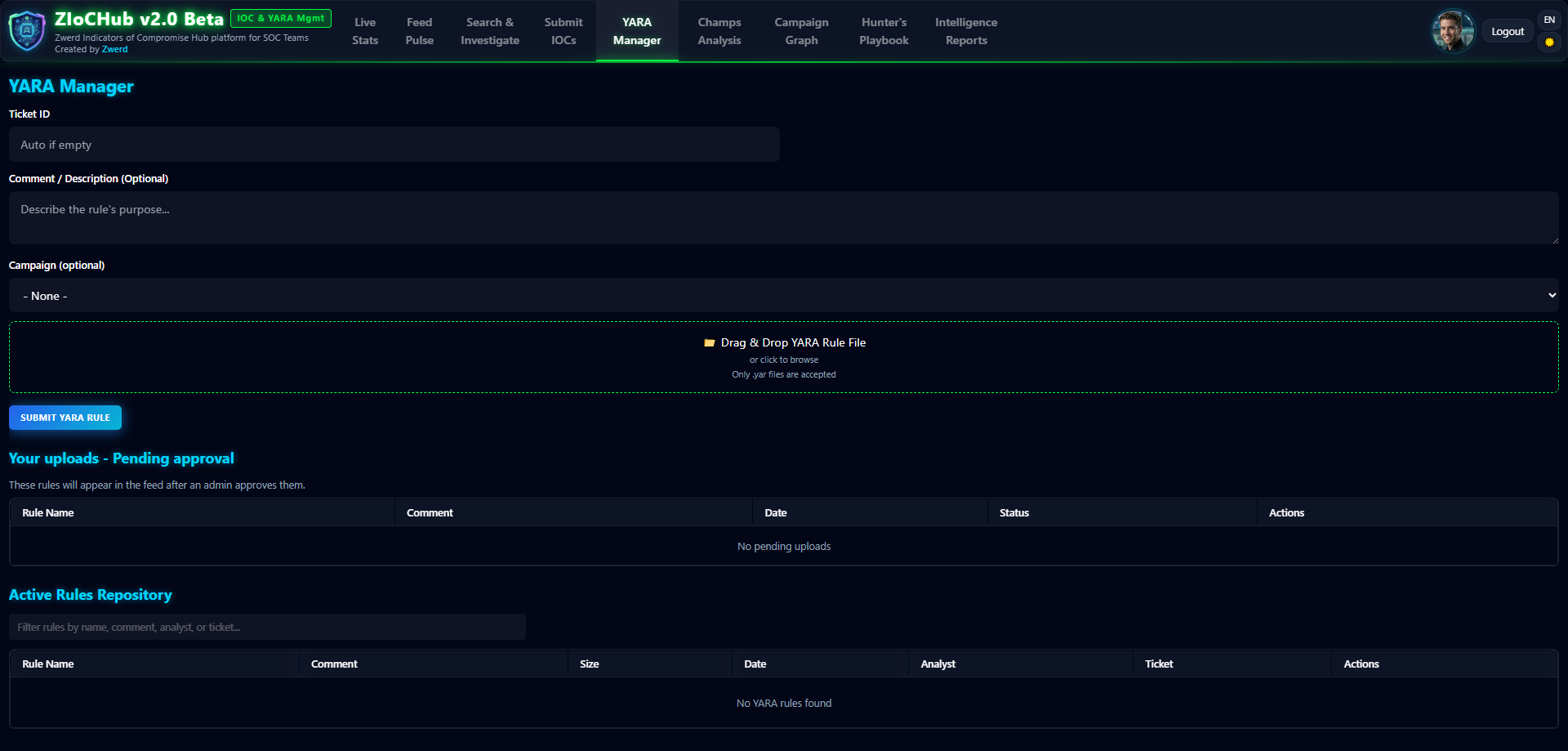
What you see here: Upload .yar files, preview, edit, approve/reject (workflow). Quality scoring (10–50 pts), campaign linking, and syntax highlighting (Prism) for easier reading.
6. Champs Analysis
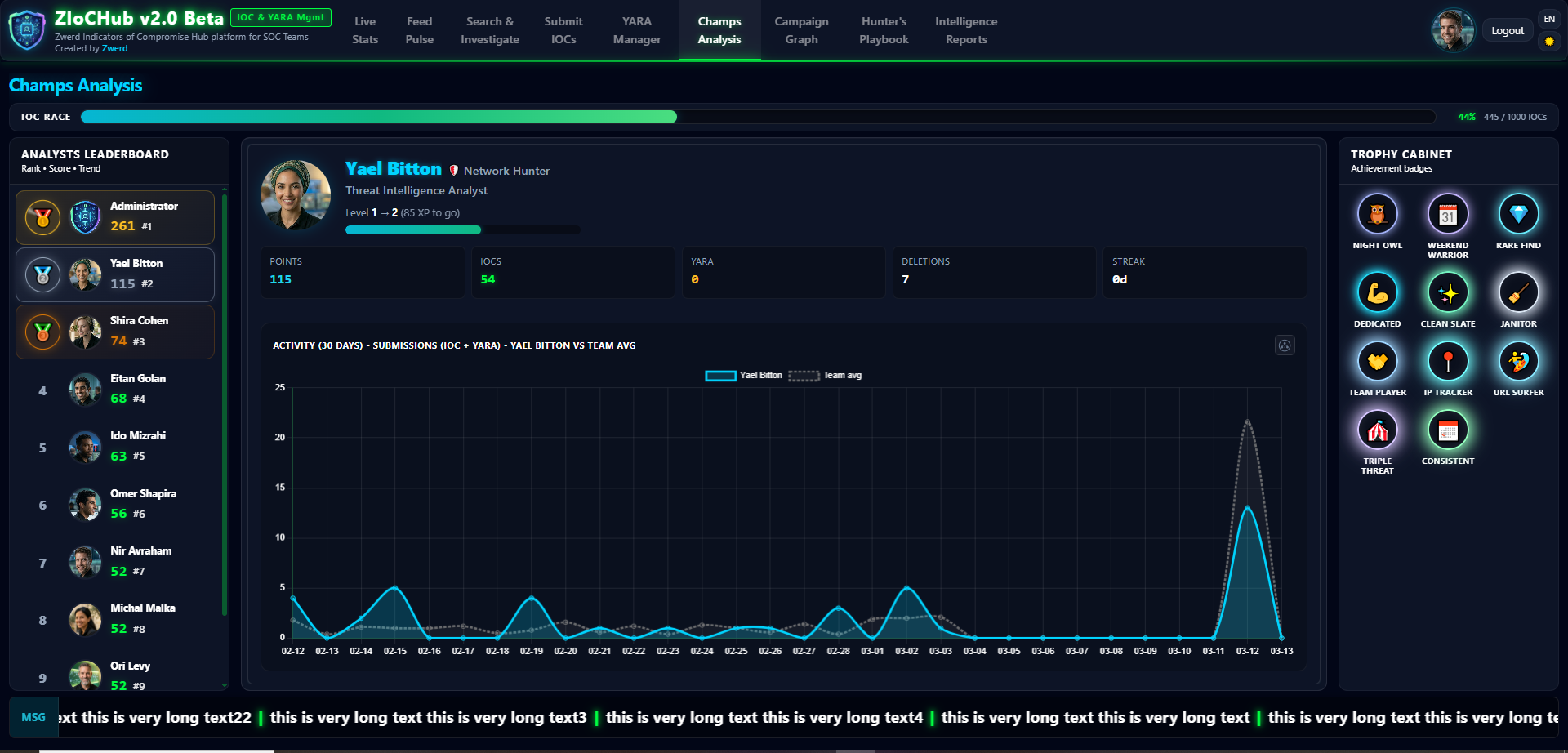
What you see here: Analyst leaderboard with eight scoring methods (Weighted, Flat, By Type, Campaign Focus, Time Decay, Quality, Goal-Based, Smart), streak bonuses, rank trends, team goals, Activity Spotlight, and News Ticker. The method is selected in Admin → Scoring.
7. Campaign Graph
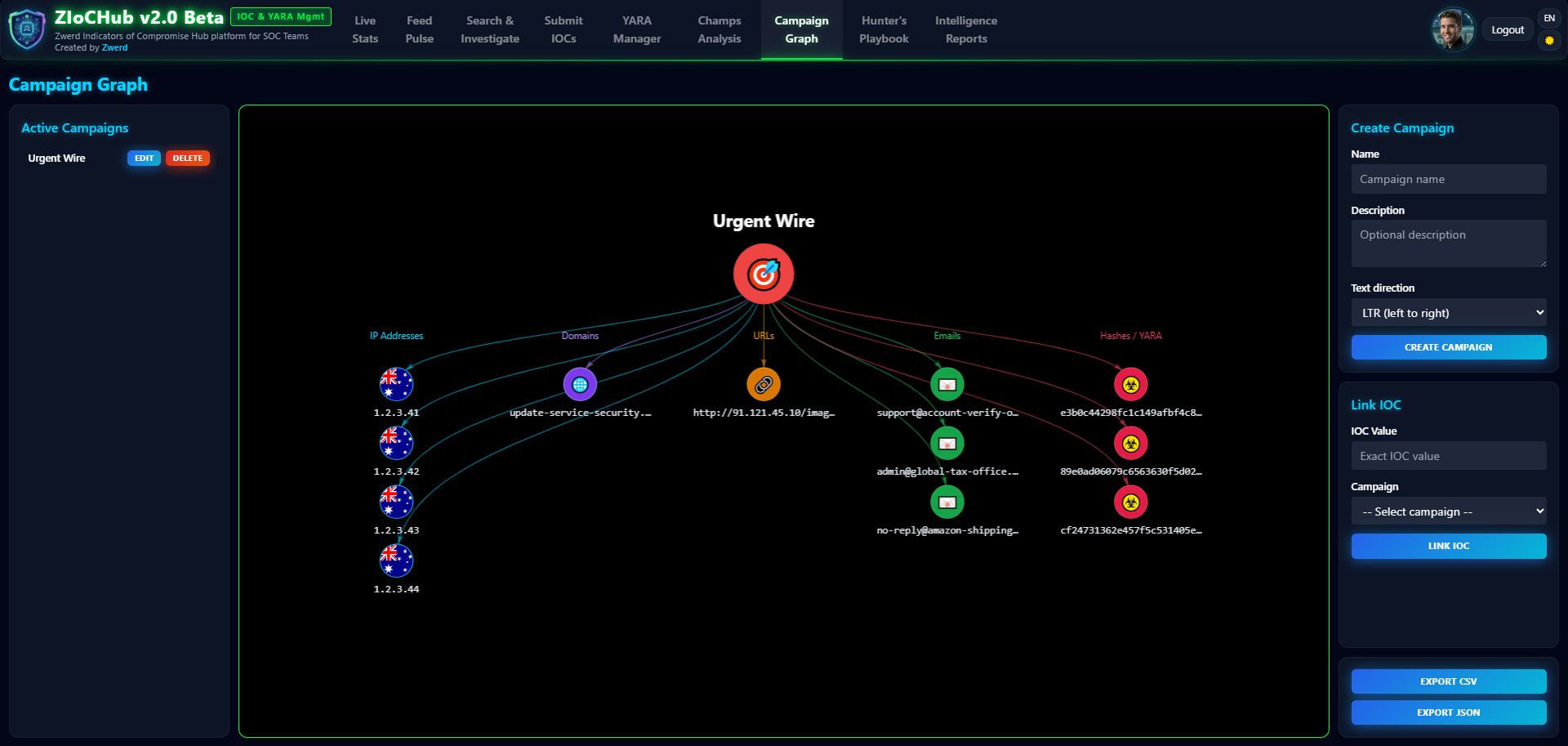
What you see here: Interactive graph (vis.js) of campaigns and their linked IOCs (and YARA). Create, link, and export to CSV.
8. Hunter’s Playbook
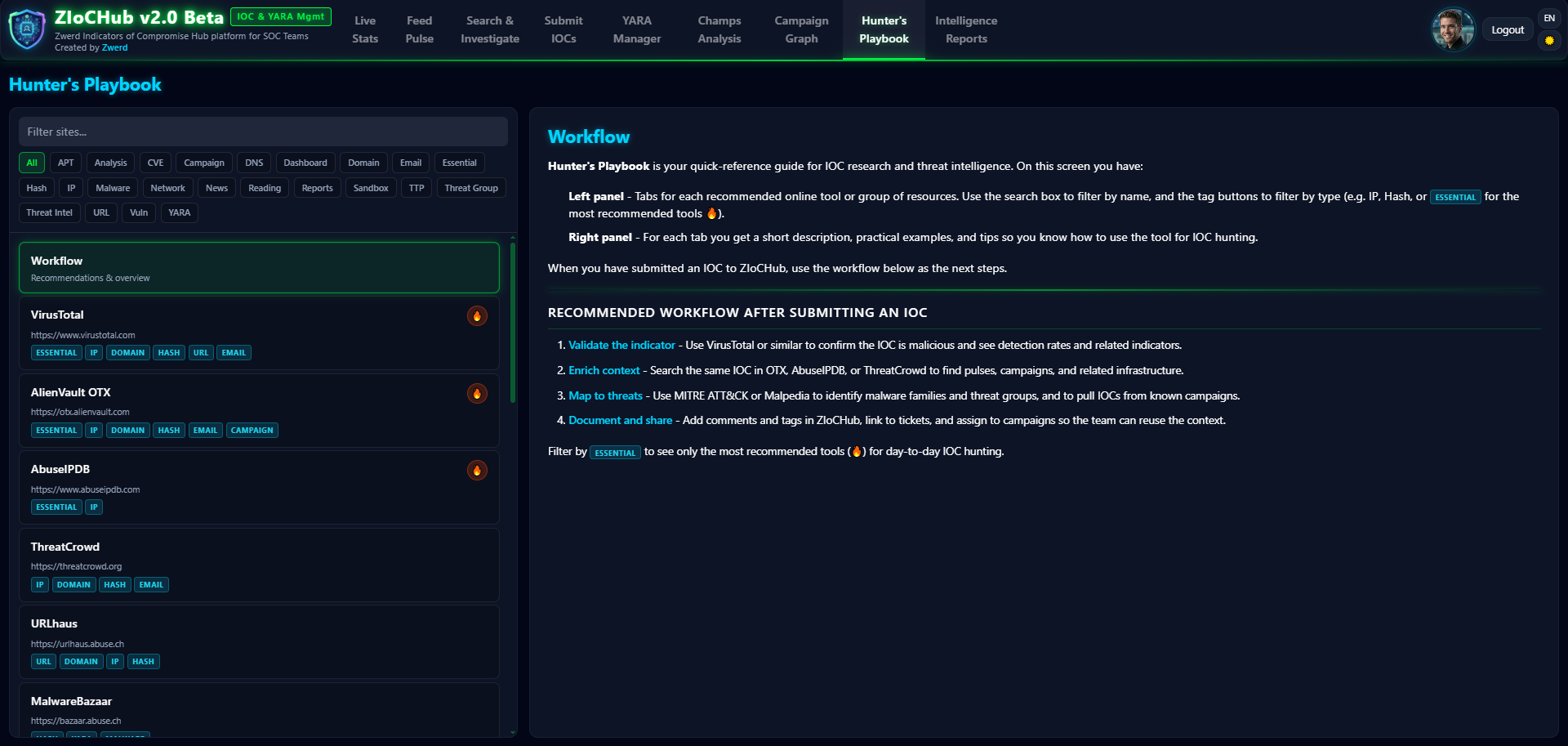
What you see here: Customizable quick-links panel (e.g. VirusTotal, OTX) for external investigation tools.
9. Intelligence Reports
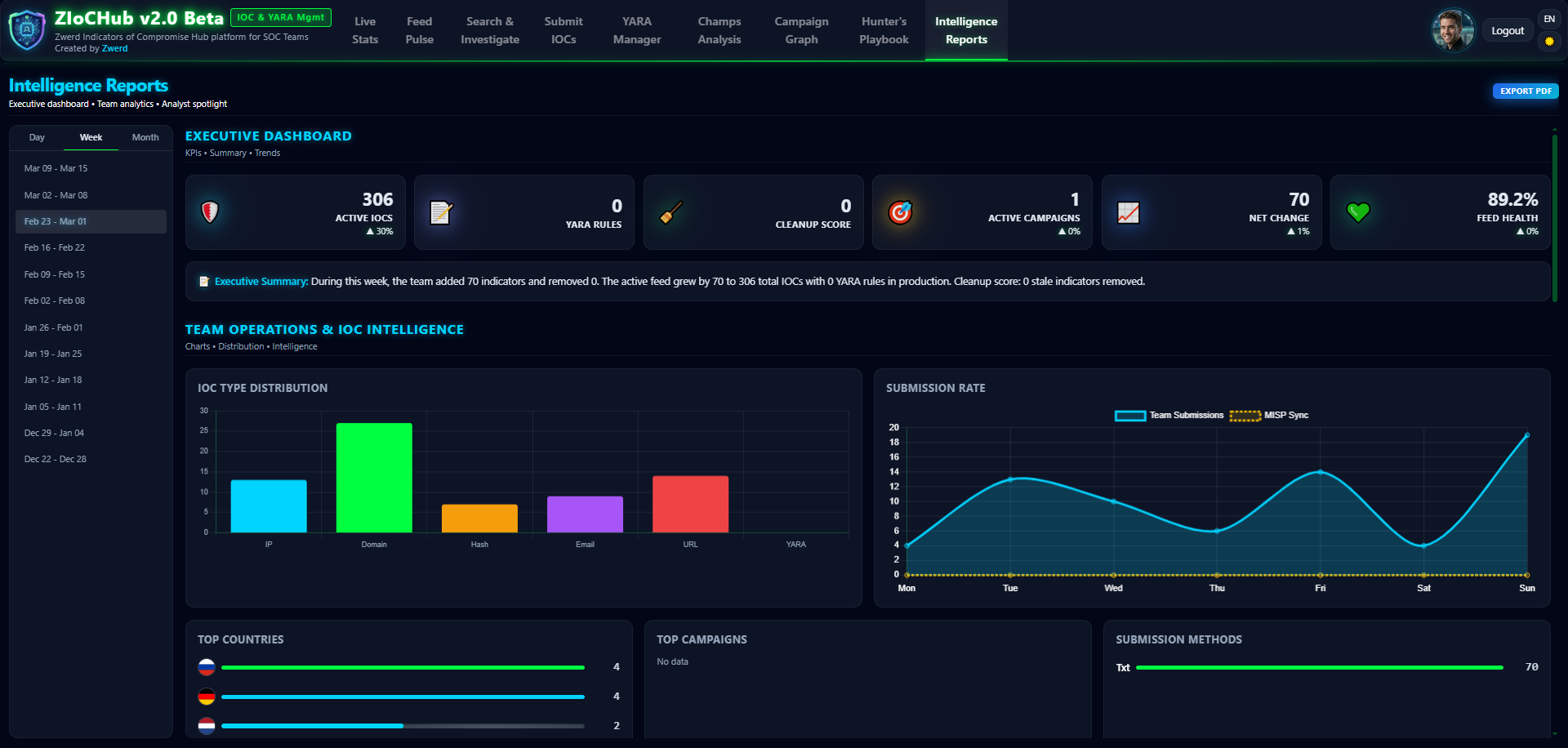
What you see here: Period-based reports (day/week/month): KPIs, type distribution, feed health score, analyst activity, comparison vs. previous period. Export to PDF (html2canvas + jsPDF).
10. Profile & Change Password
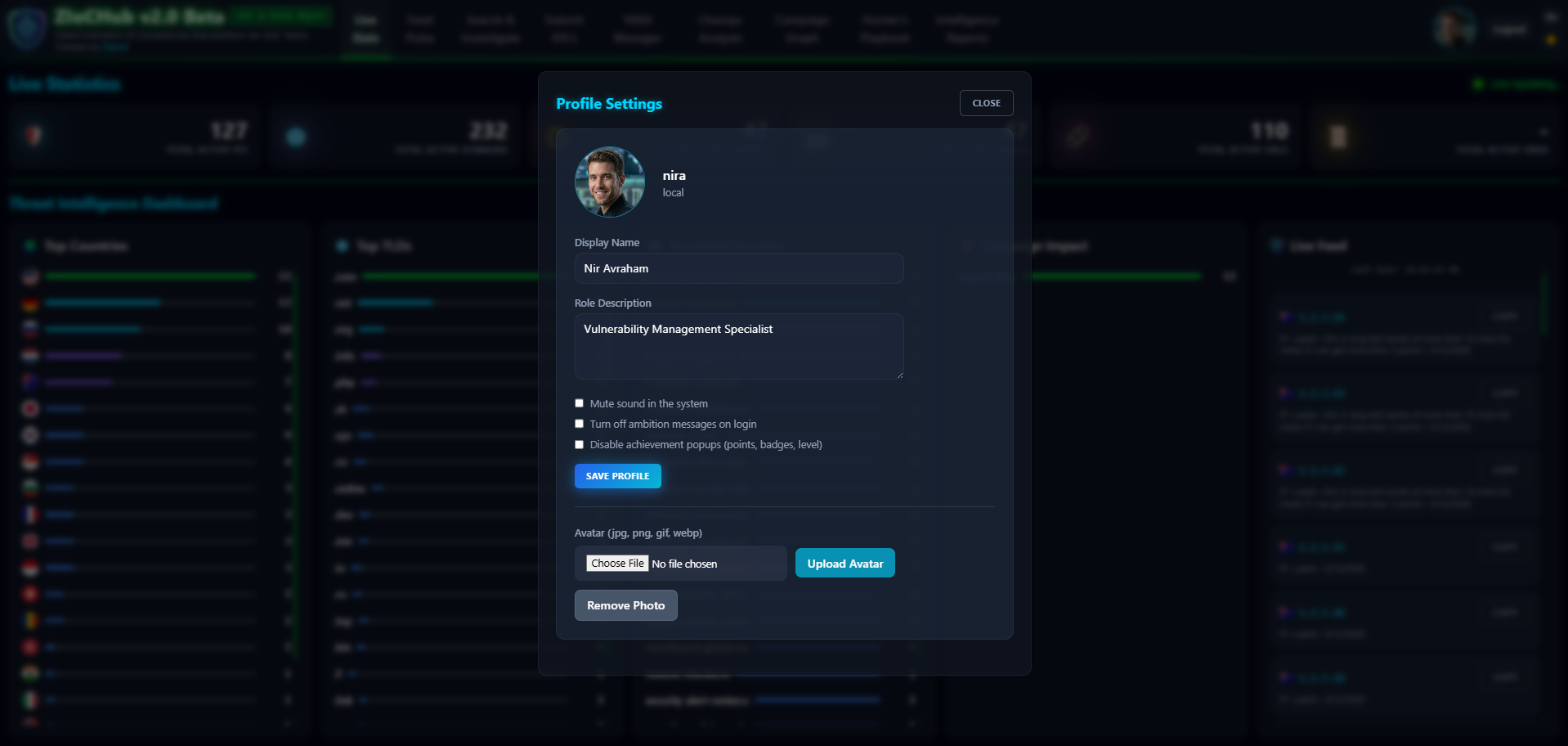
What you see here: User profile – display name, avatar, role description, email – and change-password flow. Admins can enforce “must change password” on first login.
11. Admin Panel
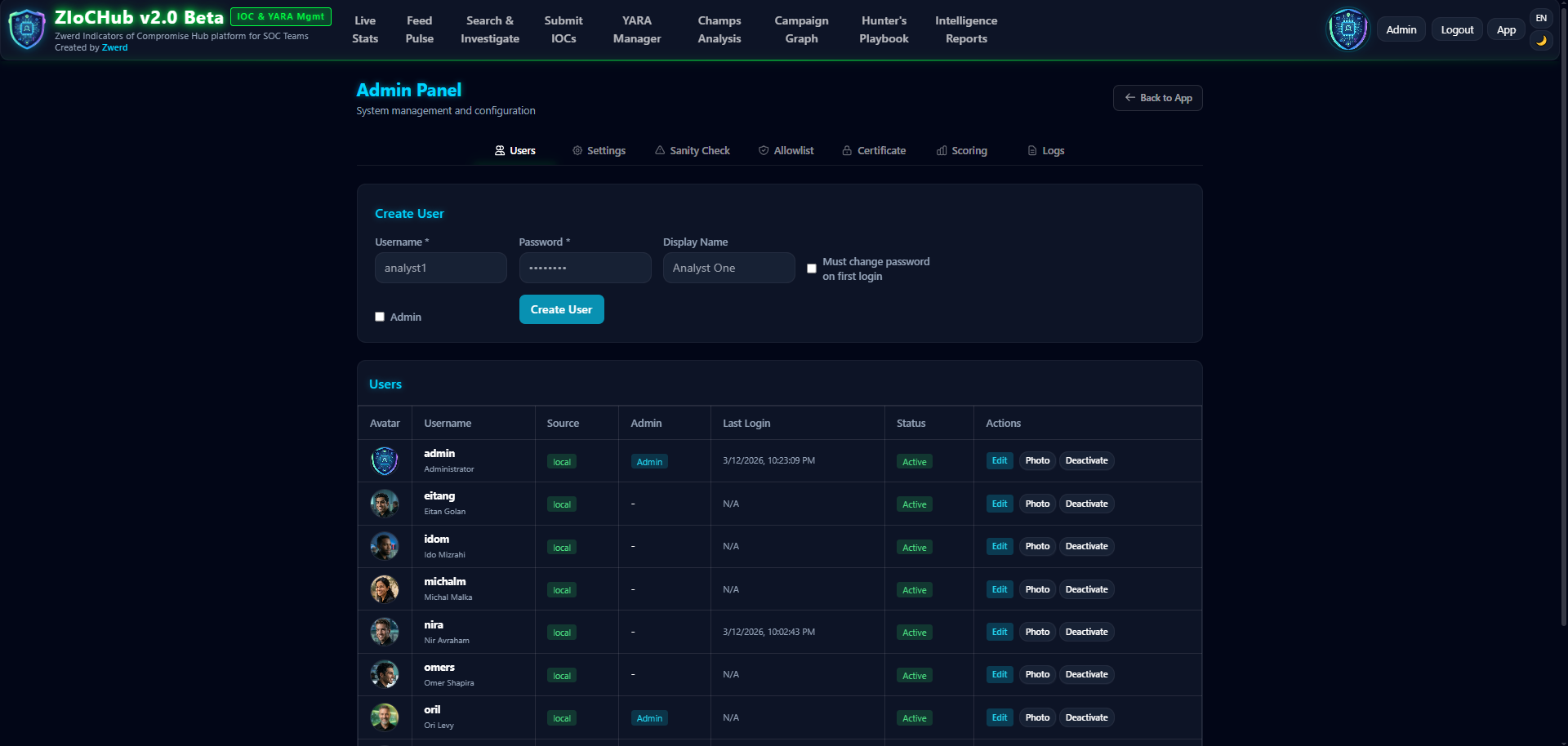
What you see here: User management (create, edit, deactivate, avatars, system users), settings (Auth: local/LDAP, LDAP, MISP, CEF/Syslog UDP), Allowlist editor, SSL/TLS certificate upload, and Champs scoring method (Weighted, Flat, By Type, Campaign Focus, Time Decay, Quality, Goal-Based, Smart).
The Architecture 🏗️
Why SQLite?
For an offline SOC environment, SQLite is perfect:
- ✅ Single-file database – easy backup/restore
- ✅ No external dependencies
- ✅ Fast and reliable
- ✅ Works on any platform
Why Flask?
Flask gives us:
- ✅ Lightweight and flexible
- ✅ Easy to deploy
- ✅ Perfect for offline environments
- ✅ Great for REST APIs and server-rendered pages
Feed Generation
ZIoCHub exposes many feed endpoints:
Standard: /feed/ip, /feed/domain, /feed/url, /feed/hash, /feed/md5, /feed/sha1, /feed/sha256
Palo Alto (EDL): /feed/pa/ip, /feed/pa/domain, /feed/pa/url (URLs without protocol), /feed/pa/md5, etc.
Checkpoint (CSV): /feed/cp/ip, /feed/cp/domain, etc. with observe numbers
YARA: /feed/yara-list, /feed/yara-content/<filename>
TAXII 2.1 / STIX 2.1: Discovery, API roots, collection indicators for active IOCs (e.g. for Cisco IronPort ESA)
Only active (non-expired) IOCs are included in feeds. Content-Type for text feeds: text/plain.
Security Features 🔐
- Authentication: Flask-Login; optional LDAP/AD with local fallback.
- Passwords: Scrypt hashing (Werkzeug).
- Input validation: Regex for all IOC types; refanger for obfuscated input.
- Allowlist: Prevents blocking critical assets.
- SQL injection: SQLAlchemy ORM (parameterized queries).
- SSL/TLS: Certificate upload via Admin; gunicorn serves HTTPS; HTTP redirect to HTTPS.
- Audit: CEF format; 48-hour local rotation; optional UDP syslog.
- Feed endpoints: Public (no auth) – restrict access via firewall.
- DEV_MODE: Must not be used in production (dev auto-login, LDAP mock).
API & Integration 🔌
ZIoCHub provides API endpoints for IOC CRUD, search, bulk submit, campaigns, YARA, reports, stats, and admin. Authentication is required (session/cookie). Example usage and exact paths are documented in the project README (Installation, API Endpoints, Feed Endpoints). Health checks and deployment details (ports, systemd) are also in the README.
Deployment 🚀
Online (Linux with Internet)
1
2
3
scp -r ZIoCHub/ user@server:/tmp/
cd /tmp/ZIoCHub
sudo ./setup.sh
Offline (Air-Gapped)
On a machine with internet:
1
2
./package_offline.sh
# Transfer ziochub_installer.zip to server
On the target server:
1
2
3
unzip ziochub_installer.zip -d ziochub_install
cd ziochub_install
sudo ./setup.sh --offline
Upgrade Existing
1
2
3
sudo ./setup.sh --upgrade
# or
sudo ./setup.sh --upgrade --offline
Default credentials: admin / admin. Change immediately in production.
What Makes This Special? 🌟
- Offline-first – No CDN, no external calls; everything local.
- Analyst-centric – UI designed so analysts actually want to use it (Champs, Playbook, Reports).
- Feed diversity – One system, multiple outputs (Standard, PA, CP, YARA, TAXII 2.1).
- Campaign visualization – vis.js graph of campaigns and IOCs.
- Safety first – Allowlist, sanity checks, full IOC history and notes.
Conclusion 🎉
What started as a simple IIS + text-file solution evolved into ZIoCHub v2.0 Beta: a full IOC & YARA management platform for SOC teams in offline/air-gapped environments. The combination of modern UI, robust backend, MISP/TAXII integration, and 100% offline architecture makes it a single place to submit, track, and feed IOCs and YARA to security devices.
If you’re in a SOC and need offline IOC (and YARA) management with multiple feed formats and TAXII 2.1 support, take a look at ZIoCHub.
Get Started
Repository: https://github.com/Zwerd/ziochub
Documentation: See the project README for installation, ports, systemd, UI overview, feed endpoints, API, MISP integration, configuration, maintenance, and troubleshooting.
Highlights:
- ✅ 100% offline; multi-format feeds (Standard, PA, CP, YARA, TAXII 2.1)
- ✅ Authentication (local + optional LDAP), profiles, Champs, Feed Pulse
- ✅ IOC history, IOC notes, allowlist, sanity checks
- ✅ Intelligence reports with PDF export
- ✅ English & Hebrew (i18n)
Built with ❤️ for SOC teams who need offline IOC & YARA management